← 文章归档4-Spring Boot Dao层
约 29 分钟阅读阅读 — 次
Spring Dao层
1. Repository层
1
2
3
4
5
6
7
8
| @Repository
public interface StoryDao extends JpaRepository<Story, Integer> {
@Modifying
@Query("update Story set posId=posId+1 where posId>:posId")
void updateCreatePosID(@Param("posId") int posId);
List<Story> findByTaskIdOrderByPosIdDesc(int taskId);
List<Story> findByTaskId(int taskId);
}
|
- @Repository对应数据访问层的Bean。表示Spring容器中会存在StoryDao的bean,当Service需要使用StoryDao的实例时,就可以将Spring创建好的bean注入:在Service只需要声明一个变量storyDao来接收。接收方式如下:
1
2
3
4
5
| @Service
public class StoryServiceImpl implements StoryService {
@Autowired
private StoryDao storyDao;
}
|
1.1. JpaRepository
1
2
3
4
5
6
7
8
| @Repository
public interface StoryDao extends JpaRepository<Story, Integer> {
@Modifying
@Query("update Story set posId=posId+1 where posId>:posId")
void updateCreatePosID(@Param("posId") int posId);
List<Story> findByTaskIdOrderByPosIdDesc(int taskId);
List<Story> findByTaskId(int taskId);
}
|
- JpaRepository实现一组JPA规范相关的方法, StoryDao接口继承了JpaRepository,就具备了通用的数据访问控制层的能力。
- JpaRepository支持接口规范方法名查询。意思是如果在接口中定义的查询方法符合它的命名规则,就可以不用写实现。比如findByTaskIdOrderByPosIdDesc实现的就是… Where story.taskId = ?1 order by story.posId desc。
- 也可以使用@Query自定义查询。 @Query与 @Modifying 两个annotation一起声明,可定义个性化更新操作,例如只涉及某些字段更新时最为常用。
- 本例的query语句意思是由于各个story有顺序关系,在新插入一个story时需要将它后面的story的位置id加一。
1.2. Jpa
- 全称Java Presistence API,java持久层API
- 通过将接口Dao层集成JPARepository来完成使用
1.3. JPA的部分标签情况
| 标签名 |
功能 |
备注 |
| @Entity |
用来表示这个类似实体类,(UserEntity) 默认对应user_entity表 |
- |
| @Column |
定义将成员属性映射到关系表中的对应列,以及对应列的结构信息 |
可以包含name、unique、nullable、length、insertable、length、updatetable、columnDefination、secondaryTable |
| @id |
用来标识指定表的逐渐,有多重生成方式 |
table(使用低层数据表)、SEQUENCE,使用序列生成唯一、INDENTITY使用数据库IDENTITY列保证唯一、AUTO 由容器挑选一个合适的方式保证唯一、NONE 容器不负责主键的生成,有程序完成 |
| @GeneratedValue(strategy = GenerationType.IDENTITY) |
用来指定生成的方式 |
- |
1.4. 自定义更新、查询、删除
1.4.1. 自定义更新
TODO
2. @Mapper注解
- 注解到Dao层的接口:这样子帮助我们自动生成处理
3. JDBC
主要步骤如下
- 登记并加载JDBC驱动器。
- 建⽴与SQL数据库的连接;
- 传送⼀个SQL操作;
- 获得数据结果;

3.1. API
1
2
3
4
5
6
7
8
9
10
11
|
Class.forName("com.mysql.jdbc.Driver");
Connection conn = DriverManager.getConnection(URL, USER, PASSWORD);
Statement stmt = conn.createStatement();
ResultSet rs = stmt.executeQuery("SELECT user_name, age FROM imooc_goddess");
while(rs.next()){
System.out.println(rs.getString("user_name")+" 年龄:"+rs.getInt("age"));
}
|
4. DAO
4.1. DAO模式
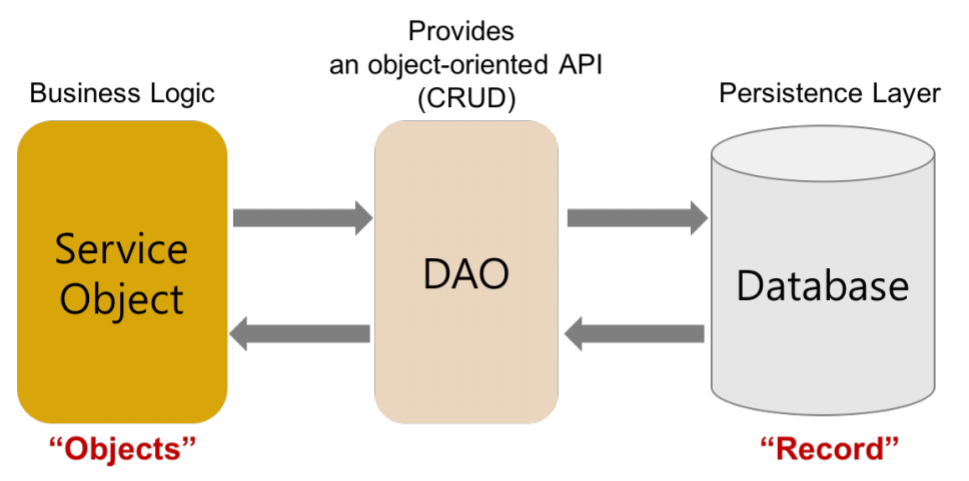
- DAO (Data Access objects 数据存取对象)是指位于业务逻辑和持久化数据之间实现对持久化数据的访问。通俗来讲,就是将数据库操作都封装起来。
4.1.1. 对外提供相应的接⼝
- 在⾯向对象设计过程中,有⼀些"套路"⽤于解决特定问题称为模式。
- DAO 模式提供了访问关系型数据库系统所需操作的接⼝,将数据访问和业务逻辑分离对上层提供⾯向对象的数据访问接⼝。
- 从以上 DAO 模式使用可以看出,DAO 模式的优势就在于它实现了两次隔离。
- 隔离了数据访问代码和业务逻辑代码。业务逻辑代码直接调⽤DAO⽅法即可,完全感觉不到数据库表的存在。分⼯明确,数据访问层代码变化不影响业务逻辑代码,这符合单⼀职能原则,降低了藕合性,提⾼了可复⽤性。
- 隔离了不同数据库实现。采⽤面向接口编程,如果底层数据库变化,如由 MySQL 变成 Oracle 只要增加 DAO 接⼝的新实现类即可,原有 MySQ 实现不⽤修改。这符合 “开-闭” 原则。该原则降低了代码的藕合性,提⾼了代码扩展性和系统的可移植性。
- 也就是我们只需要处理对象就行,而对象和数据库之间的交互交给DAO完成
4.2. 组成部分
- DAO接⼝:把对数据库的所有操作定义成抽象方法,可以提供多种实现。
1
2
3
4
5
6
| public interface PetDao {
List<Pet> findAllPets() throws Exception;
}
|
- DAO 实现类:针对不同数据库给出DAO接⼝定义方法的具体实现。
1
2
3
4
5
6
7
8
9
10
11
12
13
14
15
16
17
18
19
20
21
22
23
24
25
26
27
| public class PetDaoImpl extends BaseDao implements PetDao {
public List<Pet> findAllPets() throws Exception {
Connection conn=BaseDao.getConnection();
String sql="select * from pet";
PreparedStatement stmt= conn.prepareStatement(sql);
ResultSet rs= stmt.executeQuery();
List<Pet> petList=new ArrayList<Pet>();
while(rs.next()) {
Pet pet=new Pet(
rs.getInt("id"),
rs.getInt("owner_id"),
rs.getInt("store_id"),
rs.getString("name"),
rs.getString("type_name"),
rs.getInt("health"),
rs.getInt("love"),
rs.getDate("birthday")
);
petList.add(pet);
}
BaseDao.closeAll(conn, stmt, rs);
return petList;
}
}
|
- 实体类:⽤于存放与传输对象数据。
1
2
3
4
5
6
7
8
9
10
| public class Pet {
private Integer id;
private Integer ownerId;
private Integer storeId;
private String name;
private String typeName;
private int health;
private int love;
private Date birthday;
}
|
- 数据库连接和关闭⼯具类: 避免了数据库连接和关闭代码的重复使⽤,⽅便修改
1
2
3
4
5
6
7
8
9
10
11
12
13
14
15
16
17
18
19
20
21
22
23
24
25
26
27
28
29
30
31
32
33
34
35
36
37
38
39
40
41
42
43
44
45
46
47
48
49
50
51
52
| public class BaseDao {
private static String driver="com.mysql.jdbc.Driver";
private static String url="jdbc:mysql://127.0.0.1:3306/database_name";
private static String user="root";
private static String password="root";
static {
try {
Class.forName(driver);
} catch (ClassNotFoundException e) {
e.printStackTrace();
}
}
public static Connection getConnection() throws SQLException {
return DriverManager.getConnection(url, user, password);
}
public static void closeAll(Connection conn,Statement stmt,ResultSet rs) throws SQLException {
if(rs!=null) {
rs.close();
}
if(stmt!=null) {
stmt.close();
}
if(conn!=null) {
conn.close();
}
}
public int executeSQL(String preparedSql, Object[] param) throws ClassNotFoundException {
Connection conn = null;
PreparedStatement pstmt = null;
try {
conn = getConnection();
pstmt = conn.prepareStatement(preparedSql);
if (param != null) {
for (int i = 0; i < param.length; i++) {
pstmt.setObject(i + 1, param[i]);
}
}
ResultSet num = pstmt.executeQuery();
} catch (SQLException e) {
e.printStackTrace();
} finally {
try {
BaseDao.closeAll(conn, pstmt, null);
} catch (SQLException e) {
e.printStackTrace();
}
}
return 0;
}
}
|
5. Mybatis
- MyBatis 是⽀持定制化 SQL、存储过程以及⾼级映射的优秀的持久层框架。MyBatis 避免了⼏乎所有的JDBC 代码和⼿动设置参数以及获取结果集。MyBatis 可以对配置和原⽣Map使⽤简单的 XML 或注解,将接⼝和 Java 的 POJOs(Plain Old Java Objects,普通的 Java对象)映射成数据库中的记录。
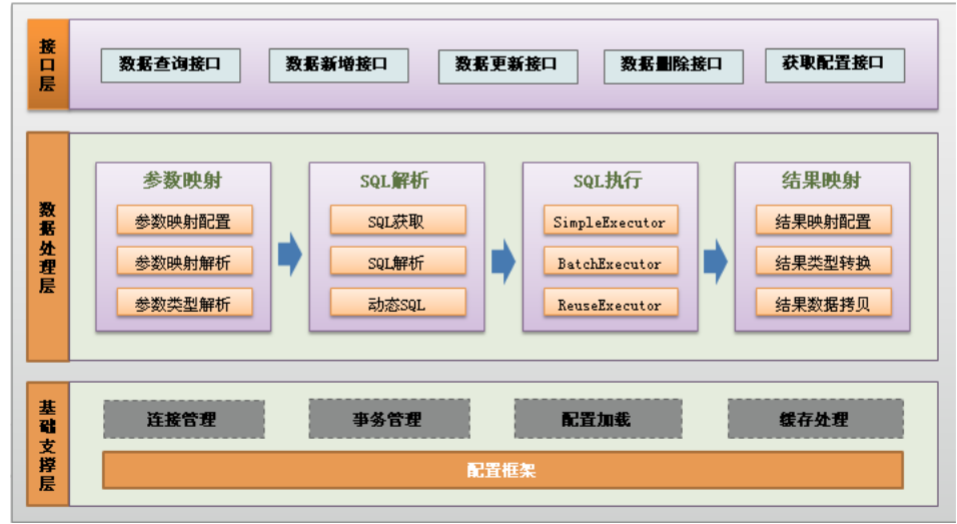
- ORM是Object和Relation之间的映射,包括Object->Relation和Relation->Object两⽅⾯。Hibernate是个完整的ORM框架,⽽MyBatis完成的是Relation->Object,也就是其所说的Data Mapper Framework。
- JPA是ORM框架标准,主流的ORM框架都实现了这个标准。MyBatis没有实现JPA,它和ORM框架的设计思路不完全⼀样。MyBatis是拥抱SQL,⽽ORM则更靠近⾯向对象,不建议写SQL,实在要写,则推荐你⽤框架⾃带的类SQL代替。MyBatis是SQL映射框架⽽不是ORM框架,当然ORM和MyBatis都是持久层框架。
- 最典型的ORM 框架是Hibernate,它是全⾃动ORM框架,⽽MyBatis是半⾃动的。Hibernate完全可以通过对象关系模型实现对数据库的操作,拥有完整的JavaBean对象与数据库的映射结构来⾃动⽣成SQL。⽽MyBatis仅有基本的字段映射,对象数据以及对象实际关系仍然需要通过⼿写SQL来实现和管理。
5.1. 配置文件
1
2
3
4
5
6
7
8
9
10
11
12
13
14
15
16
| spring:
datasource:
url: jdbc:mysql://localhost:3306/Hotel?
serverTimezone=CTT&characterEncoding=UTF-8
username: root
password: ******
driver-class-name: com.mysql.cj.jdbc.Driver
max-active: 200
max-idle: 20
min-idle: 10
thymeleaf:
cache: false
jackson:
time-zone: GMT+8
mybatis:
mapper-locations: classpath:dataImpl/*/*Mapper.xml
|
5.2. 实体情况
1
2
3
4
5
6
7
8
9
10
11
12
13
14
15
| @Mapper
@Repository
public interface AdminMapper {
int addManager(User user);
List<User> getAllManagers();
}
public class User {
private Integer id;
private String email;
private String password;
private String userName;
private String phoneNumber;
private double credit;
private UserType userType;
}
|
5.3. 映射的xml文件
1
2
3
4
5
6
7
8
9
10
11
12
13
14
15
16
17
18
19
20
| <?xml version="1.0" encoding="UTF-8"?>
<!DOCTYPE mapper PUBLIC "-//mybatis.org//DTD Mapper 3.0//EN"
"http://mybatis.org/dtd/mybatis-3-mapper.dtd">
<mapper namespace="com.example.hotel.data.admin.AdminMapper">
<insert id="addManager" parameterType="com.example.hotel.po.User" useGeneratedKeys="true" keyProperty="id">
insert into User(email,password,usertype)values(#{email},#{password},#{userType})
</insert>
<select id="getAllManagers" resultMap="User">
select * from User where usertype='HotelManager'
</select>
<resultMap id="User" type="com.example.hotel.po.User">
<id column="id" property="id"></id>
<result column="email" property="email"></result>
<result column="password" property="password"></result>
<result column="username" property="userName"></result>
<result column="phonenumber" property="phoneNumber"></result>
<result column="credit" property="credit"></result>
<result column="usertype" property="userType"></result>
</resultMap>
</mapper>
|
5.4. 参考
- Spring Boot入门之Mybatis集成
6. ORM和Mybatis
6.1. ORM
| 关系型数据库 |
⾯向对象 |
| 数据库的表(table) |
类(class) |
| 记录(record,⾏数据) |
对象(object) |
| 字段(field) |
对象的属性(attribute) |
6.2. 例子
1
2
3
| SELECT id, first_name, last_name, phone, birth_date, sex
FROM persons
WHERE id = 10
|
1
2
| res = db.execSql(sql);
name = res[0]["FIRST_NAME"];
|
1
2
| p = Person.get(10);
name = p.first_name;
|

评论